How to Whitelist Staging Diva
So You Can Receive Emails
We want to make sure you get all the free and paid products you’ve signed up for. Follow the step-by-step instructions below to whitelist Staging Diva and help ensure that our emails don’t end up in your SPAM or JUNK folders where you’ll never see them!
How to Whitelist Staging Diva in Gmail
Add our email address (debra@stagingdiva.com) to your contacts list:
- Click Contacts
- Click Add Contact
- Type or copy & paste debra@stagingdiva.com into the primary email address
- Click Save
- Click Spam (along the left-hand side of the page)
- Check the box next to debra@stagingdiva.com
- Click the Not Spam button
You can also make sure that our emails are not going into your Promotions folder. If you click the “Promotions” tab at the top of your Gmail interface and see any emails from our address, drag them back to the main Inbox tab (called “Primary”):

Once you’ve dragged the email to the Primary tab, you’ll see this message:

To ensure that future emails are delivered right to your inbox, click “Yes.”

How to Whitelist Staging Diva on AOL
Add our email address: debra@stagingdiva.com, to your address book:
- Click on the Mail menu
- Click on Address Book
- Click the Add button
- Type or copy & paste debra@stagingdiva.com into the “Other E-Mail” field
- Make our From address the “Primary E-Mail” address by checking the check box
- Click the Save button
 How to Whitelist Staging Diva in Yahoo!
 How to Whitelist Staging Diva in Yahoo!
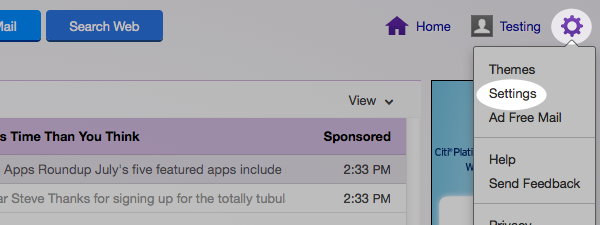
Log into your account, hover over the “Settings” icon and click “Settings”.
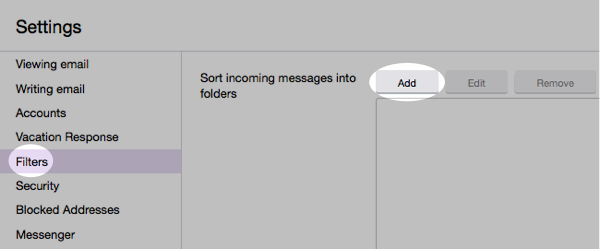
In the “Settings” tab, select “Filters” from the left menu and click the button to “Add” a filter.
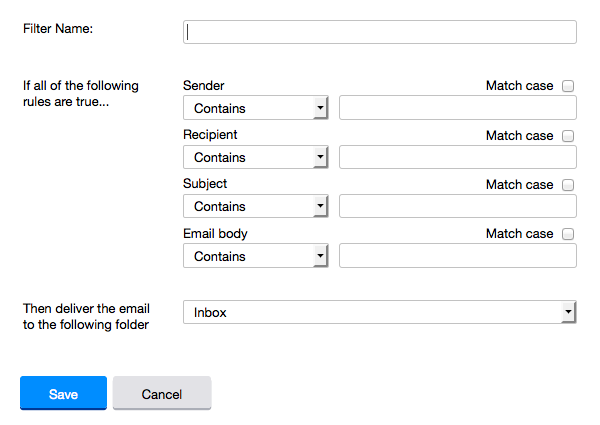
Type a name for your filter in the “Filter name” field. Select “contains” in the “sender” drop-down menu. Type debra@stagingdiva.com in the “sender” text field. In the “Move to Folder” drop-down menu, select “Inbox”. Click the “Save” button in the top bar to save the filter.

How to Whitelist Staging Diva in Hotmail
You will need to add our email address: debra@stagingdiva.com and info@stagingdiva.com to your safe list. Here are the instructions step-by-step:
- If you find email from stagingdiva.com in your Hotmail junk folder, open the email and click “Not Junk”.
- Next, check to see if the stagingdiva.com appears in the “Blocked Senders” list. If so, select it and click on the “Remove” button.
- Open your mailbox and click “Options” in the upper right hand corner.
- At the top of the page, click on the “Junk E-mail Protection” link.
- Next, click on “Safe List”, which is down near the bottom.
- Where it says “Type an address or domain”, put stagingdiva.com
- Click the “Add” button.
Use these instructions if you’re using Hotmail with Outlook:
To choose from which addresses Hotmail should never send email to spam, access the Safe senders list and type the email addresses into the list.
- Click the settings gear icon at the top right of Outlook.com.
- Click View all Outlook settings at the bottom of the pop-out menu.
- Go to Mail > Junk email.
- Type stagingdiva.com in the text box in the Safe senders area.
- Click Add.
- Click Save at the top of the page.

How to Whitelist Staging Diva in Mozilla Thunderbird
You will need to add our email address: debra@stagingdiva.com to your address book and configure your controls to white list your address book.
Add debra@stagingdiva.com to your address book:
- Click Address Book
- Make sure Personal Address Book is highlighted
- Click the New Card button. This will launch a New Card window that has 3 tabs: Contact, Address & Other.
- Under the Contact tab, type or copy & paste debra@stagingdiva.com into the Email dialog box
- Click OK
You also have the ability to right-click any email address you see in Thunderbird and select “Add to Address Book.”
Here are the directions for white listing your entire Personal Address Book:
- From the main drop down menu, select “Tools -> Junk Mail Controls…”
- Junk Mail Controls window will open and it has two tabs:Settings and Adaptive Filter
- Under the Settings tab, update the “White Lists” by selecting Personal Address Book from the pull down menu and then check mark the box next to “Do not mark messages as junk mail”
- Click OK

How to Whitelist Staging Diva in Microsoft Outlook
You will need to add debra@stagingdiva.com, to your safe senders list:
- Go to Tools
- Click Options
- Preferences tab
- Click Junk E-mail
- On the Safe Senders tab, click Add
- Add address, copy Type or copy & paste debra@stagingdiva.com
- Click OK.
How to Whitelist Staging Diva in Others Email Programs
If you utilize a webmail or other email system than is listed above, you can typically bypass SPAM filters by typing or copying & pasting debra@stagingdiva.com into your address book, contact list or safe list.
If you are not receiving our emails, check your SPAM, bulk and/or junk mail folder. You can typically choose to mark these messages as “Not Junk” or “Not SPAM”.
For additional assistance search “how to whitelist and email address” on whatever platform you are using then follow their instructions.